 mc_rtc
mc_rtc
mc_rtc
mc_rtc::Configuration general purpose configurationThe objective in this section is to coordinate two arms, specifying collision constraints between them, achieving cooperative motion.
Note: this article assumes you are able to run and visualize the controller using ROS.
We will build a simple controller that will load UR5e as the main robot and Kinova as the second robot, which is provided as mc_rtc robot module mc_ur5e, mc_ur5e_description and mc_kinova respectively. The robot module is the interface software, allowing `mc_rtc` to communicate - sending commands and receiving feedback - with that specific robot type. While the robot's description contains lists of joints, links, and other physical attribute of the robots that is necessary to to simulate and control the robot. mc_kinova contains both module and description of the Kinova robot.
To load UR5e as the main robot, mc_rtc configuration file need to be modified as follows:
MainRobot: UR5e
Enabled: DualArmController
Now, let's build a controller that takes dual arm robots as input:
To do so, we will modify the constructor:
#include <mc_rbdyn/RobotLoader.h>

DualArmController::DualArmController(mc_rbdyn::RobotModulePtr rm, double dt, const mc_rtc::Configuration & config)
: mc_control::MCController({rm,
mc_rbdyn::RobotLoader::get_robot_module("KinovaDefault")}, dt)@staticmethod
def create(robot, dt):
kinova = mc_rbdyn.get_robot_module("KinovaDefault")
return DualArmController([robot, kinova], dt)
If you installed mc_rtc and mc_kinova and build the project using mc-rtc-superbuild,
the function can simply be mc_rbdyn::RobotLoader::get_robot_module("KinovaDefault").
In this new example, we have loaded an extra robot: kinova. We have done so by providing a list of robot modules to load. The loaded robots are then indexed according to the order in which the modules were provided. It means that our main robot UR5e still has the index 0, however we now have the Kinova robot at index 1.
You can also adding multiple robots by following this tutorial.
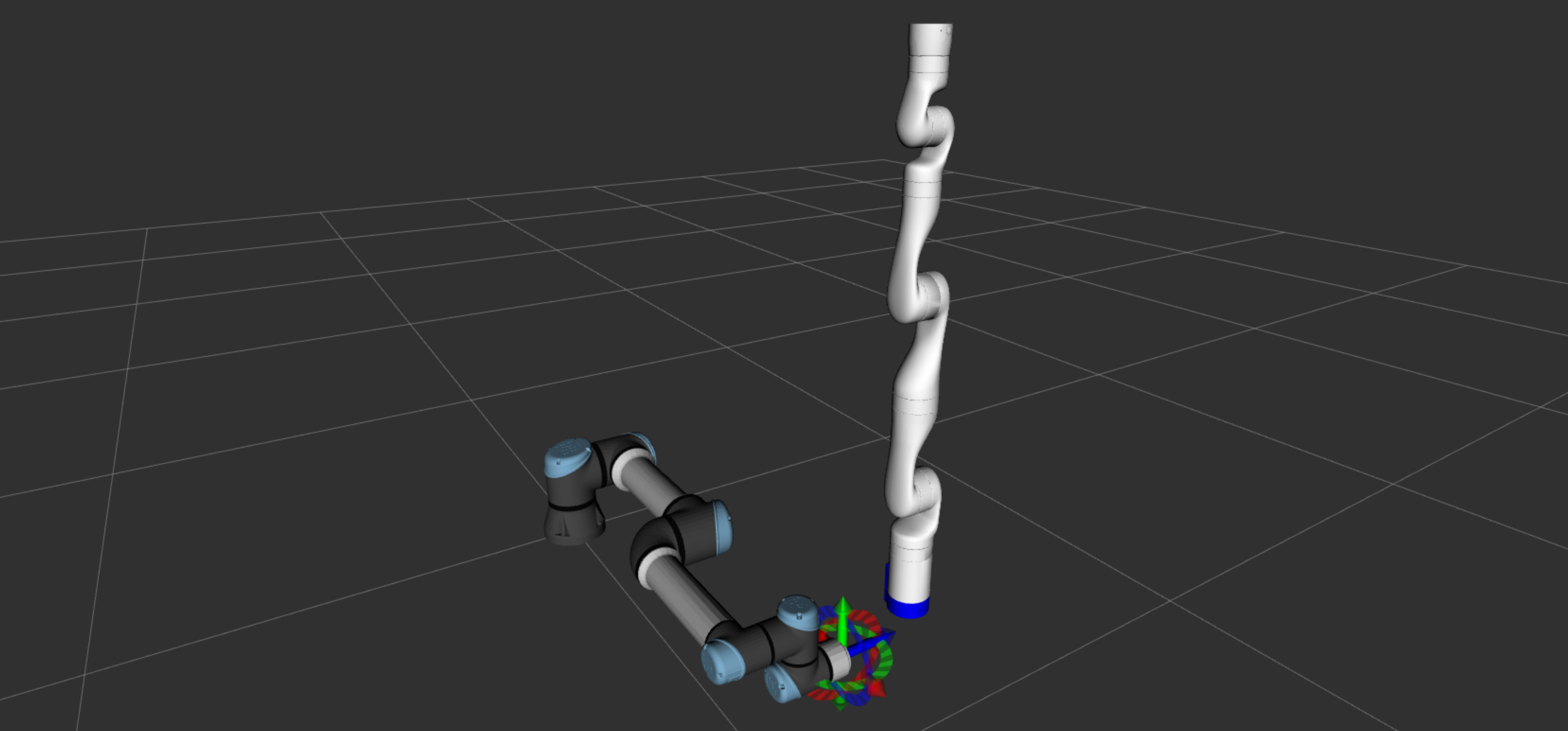
If you start the controller now, you will notice that the Kinova and the UR5e are in the same location, for the purpose of this tutorial, we will manually reposition the Kinova:
// In the reset function
robots().robot(1).posW(sva::PTransformd(sva::RotZ(M_PI), Eigen::Vector3d(0.7, 0.5, 0)));
# In the reset callback
self.robots().robot(1).posW(
sva.PTransformd(sva.RotZ(math.pi), eigen.Vector3d(0.7, 0.5, 0))
)
For each robot, we will add tasks and constraints. To demonstrate different possibilities, we will add end-effector task for UR5e and posture task for Kinova robot. Moreover, we will add collision constraint between two robots to avoid collision during motion. First we will add tasks and constraints for UR5e robot:
// In the header
#include <mc_tasks/EndEffectorTask.h>

struct DualArmController_DLLAPI DualArmController : public mc_control::MCController
{
  // ...
  std::shared_ptr<mc_tasks::EndEffectorTask> urEndEffectorTask_;
  // ...
}

// In the reset function
std::string urBody = "tool0";
urEndEffectorTask_ = std::make_shared<mc_tasks::EndEffectorTask>(urBody, robots(), 0, 1);
# In the reset callback
self._urEndEffectorTask = mc_tasks.EndEffectorTask("tool0", self.robots(), 0, 1.0)Then we will add tasks for Kinova robot:
// In the header
std::shared_ptr<mc_tasks::PostureTask> kinovaPostureTask_;
std::unique_ptr<mc_solver::KinematicsConstraint> kinovaKinematics_;

// In the reset function
kinovaPostureTask_ = std::make_shared<mc_tasks::PostureTask>(solver(), 1);
solver().addTask(kinovaPostureTask_);
kinovaKinematics_ = std::make_unique<mc_solver::KinematicsConstraint>(robots(), 1, solver().dt());
solver().addConstraintSet(kinovaKinematics_);
# In the reset callback
self._kinovaPostureTask = mc_tasks.PostureTask(self.qpsolver, 1, 5.0, 1000.0)
self._kinovaKinematicsConstraint = mc_solver.KinematicsConstraint(
self.robots(), 1, self.qpsolver.dt()
)
self.qpsolver.addTask(self._kinovaPostureTask)
self.qpsolver.addConstraintSet(self._kinovaKinematicsConstraint)Finally we will add collision constraint between two robots:
// In the constructor or reset function
double iDist = 0.1;
double sDist = 0.05;
double damping = 0.0;
addCollisions("ur5e", "kinova_default", {{"*", "*", iDist, sDist, damping}});
# In the constructor or reset callback
iDist, sDist, damping = 0.1, 0.05, 0.0
self.addCollisions(
"ur5e",
"kinova_default",
[mc_rbdyn.Collision("*", "*", iDist, sDist, damping)],
)In that part of the tutorial we will setup the logic of our controller. We want to:
So, our code will reflect that:
// In the header
enum ControllerPhase
{
  IDLE = 0,
  STARTED,
  MOVE
};
// A private property of our controller
ControllerPhase phase_ = IDLE;
// In the run function
bool DualArmController::run()
{
  if(phase_ == IDLE && 0 /** we write this condition later */)
  {
    /** Setup the STARTED phase */
    phase_ = STARTED;
  }
  else if(phase_ == STARTED && 0 /** we write this condition later */)
  {
    /** Setup the MOVE phase */
    phase_ = MOVE;
  }
  else if(phase_ == MOVE && 0 /** we write this condition later */) {}
  return mc_control::MCController::run();
}
# Declare constants
class ControllerPhase:
IDLE = 0
STARTED = 1
MOVE = 2
# In constructor
def __init__(self, rm, dt):
self._phase = IDLE
# In the run callback
def run_callback(self):
if self._phase == ControllerPhase.IDLE and False: # We write this condition later
# Setup the STARTED phase
self._phase = ControllerPhase.STARTED
elif (
self._phase == ControllerPhase.STARTED and False
): # We write this condition later
# Setup the MOVE phase
self._phase = ControllerPhase.MOVE
elif self._phase == ControllerPhase.MOVE and False: # We write this condition later
# Continue the MOVE phase
pass
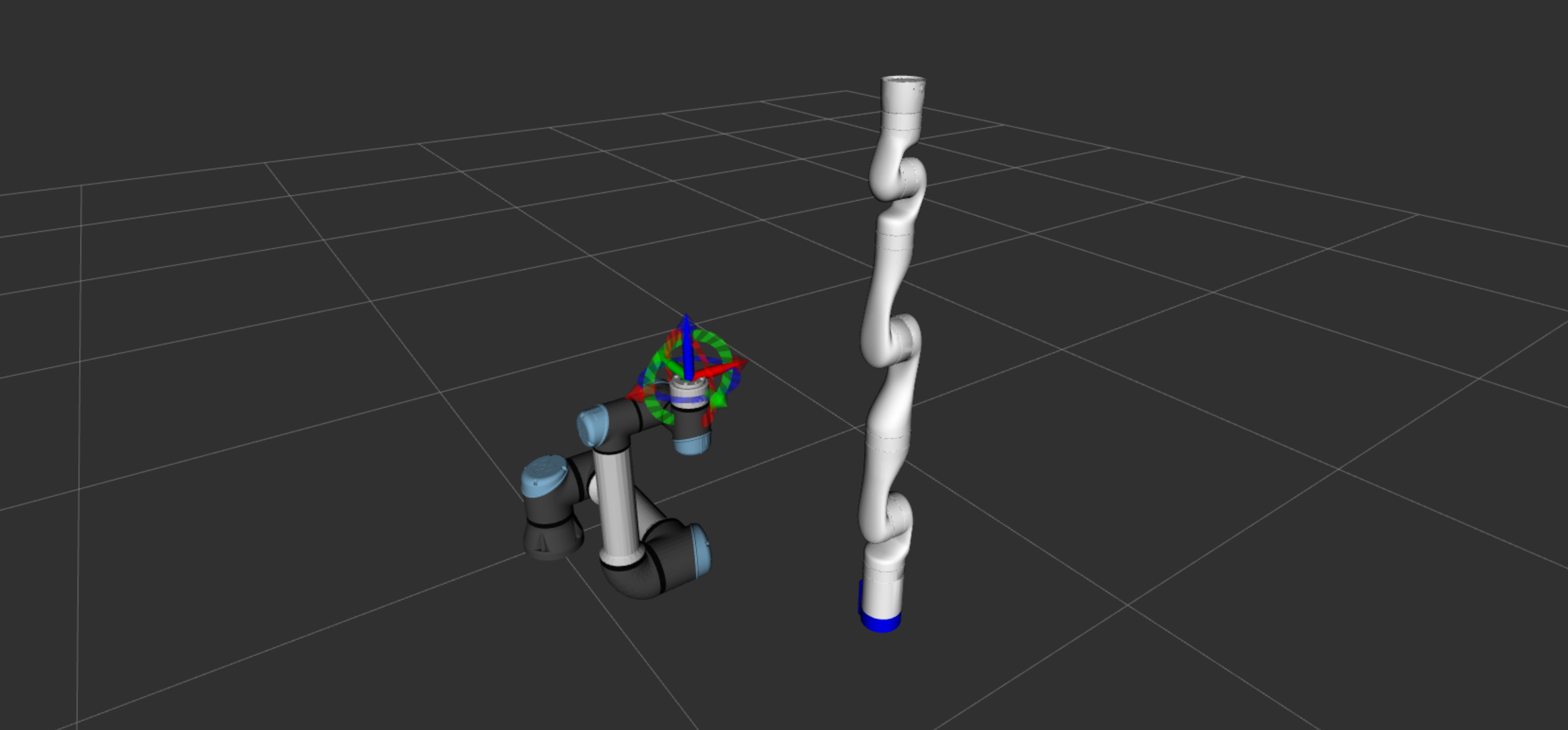
return TrueFor this phase, we move the main robot UR5e to a predefined standby pose using a posture task. In order not to conflict with the end-effector task, we temporarily disable the end-effector task during this phase then re-enable it once the posture task is achieved.
Note: if we don't disable the end-effector task, both tasks will compete against each other and the robot won't be able to reach the desired pose.
// In the run function
bool DualArmController::run()
{
  if(phase_ == IDLE)
  {
    postureTask->target({{"elbow_joint", {-M_PI / 2}}, {"wrist_2_joint", {M_PI / 2}}});
    phase_ = STARTED;
  }
  // ...
}
# In the run callback
def run_callback(self):
if self._phase == ControllerPhase.IDLE:
self.postureTask.target(
{
"elbow_joint".encode("utf-8"): [-math.pi / 2],
"wrist_2_joint".encode("utf-8"): [math.pi / 2],
}
)
self._phase = ControllerPhase.STARTED
# ...
In this phase, we will check if the posture task of UR5e is achieved to reset the target of end-effector task and enable it.
// In the run function
bool DualArmController::run()
{
  // ...
  else if(phase_ == STARTED && postureTask->eval().norm() < 0.01 && postureTask->speed().norm() < 0.01)
  {
    phase_ = MOVE;
    solver().addTask(urEndEffectorTask_);
  }
  else if(phase_ == STARTED)
  {
    urEndEffectorTask_->reset();
  }
  // ...
  return mc_control::MCController::run();
}
# In the run callback
def run_callback(self):
# ...
elif (
self._phase == ControllerPhase.STARTED
and self.postureTask.eval().norm() < 0.01
and self.postureTask.speed().norm() < 0.01
):
self._phase = ControllerPhase.MOVE
self.qpsolver.addTask(self._urEndEffectorTask)
elif self._phase == ControllerPhase.STARTED:
self._urEndEffectorTask.reset()
# ...
return TrueThis phase is the main phase where both arms will perform repetitive motions. For UR5e, we will move the end-effector in a straight line, while for Kinova, we will make it's second joints to oscillate back and forth.
// ヘッダー内
enum ControllerState
{
  GO = 0,
  RETURN
};

// Controller's private properties
ControllerState urState_ = RETURN;
ControllerState kinovaState_ = RETURN;

// Two support functions added
void DualArmController::runUr()
{
  if(urState_ == GO && urEndEffectorTask_->eval().norm() < 0.05 && urEndEffectorTask_->speed().norm() < 0.01)
  {
    urState_ = RETURN;
    urEndEffectorTask_->add_ef_pose({Eigen::Vector3d(0.0, -0.5, 0.0)});
  }
  else if(urState_ == RETURN && urEndEffectorTask_->eval().norm() < 0.01 && urEndEffectorTask_->speed().norm() < 0.05)
  {
    urState_ = GO;
    urEndEffectorTask_->add_ef_pose({Eigen::Vector3d(0.0, 0.5, 0.0)});
  }
}

void DualArmController::runKinova()
{
  if(kinovaState_ == GO && kinovaPostureTask_->eval().norm() < 0.01 && kinovaPostureTask_->speed().norm() < 0.01)
  {
    kinovaState_ = RETURN;
    kinovaPostureTask_->target(joint_2});
  }
  else if(kinovaState_ == RETURN && kinovaPostureTask_->eval().norm() < 0.01
          && kinovaPostureTask_->speed().norm() < 0.01)
  {
    kinovaState_ = GO;
    kinovaPostureTask_->target(joint_2});
  }
}
// run function
bool DualArmController::run()
{
  // ...
  else if(phase_ == MOVE)
  {
    runUr();
    runKinova();
  }
  return mc_control::MCController::run();
}
# Define state constants
class ControllerState:
GO = 0
RETURN = 1
# In the constructor
def __init__(self, rm, dt):
self._ur_state = ControllerState.RETURN
self._kinova_state = ControllerState.RETURN
# Add helper methods
def _run_kinova(self):
if (
self._kinova_state == ControllerState.GO
and self._kinovaPostureTask.eval().norm() < 0.01
and self._kinovaPostureTask.speed().norm() < 0.01
):
self._kinova_state = ControllerState.RETURN
self._kinovaPostureTask.target(
{
"joint_2".encode("utf-8"): [0.0],
}
)
elif (
self._kinova_state == ControllerState.RETURN
and self._kinovaPostureTask.eval().norm() < 0.01
and self._kinovaPostureTask.speed().norm() < 0.01
):
self._kinova_state = ControllerState.GO
self._kinovaPostureTask.target(
{
"joint_2".encode("utf-8"): [-math.pi / 4],
}
)
def _run_ur5e(self):
if (
self._ur_state == ControllerState.GO
and self._urEndEffectorTask.positionTask.eval().norm() < 0.05
and self._urEndEffectorTask.positionTask.speed().norm() < 0.05
):
self._ur_state = ControllerState.RETURN
self._urEndEffectorTask.add_ef_pose(sva.PTransformd(
sva.RotZ(0), eigen.Vector3d(0.0, -0.5, 0.0)
))
elif (
self._ur_state == ControllerState.RETURN
and self._urEndEffectorTask.positionTask.eval().norm() < 0.05
and self._urEndEffectorTask.positionTask.speed().norm() < 0.05
):
self._ur_state = ControllerState.GO
self._urEndEffectorTask.add_ef_pose(sva.PTransformd(
sva.RotZ(0), eigen.Vector3d(0.0, 0.5, 0.0)
))
# In the run callback
def run_callback(self):
# ...
elif self._phase == ControllerPhase.MOVE:
self._run_ur5e()
self._run_kinova()
return TrueAt this point, both arms should be performing repetitive motions.
If UR5e fails to perform the task, it might be because the PostureTask is overpowering the EndEffectorTask.
You can solve this problem by tuning task's gains (weight, stiffness, damping).
weight sets the priority of each task.
By default, weight of EndEffectorTask is already higher than of PostureTask.
On the other hand, stiffness and damping controls the speed and smoothness of the motion.
The usual procedure when setting up a controller is to set the weight and then tune to stiffness and damping gains.
Note that damping = 2*sqrt(stiffness)
Tuning these gains can be done using the task constructor or available methods, such as weight ( double w ) or setGains ( double stiffness, double damping )
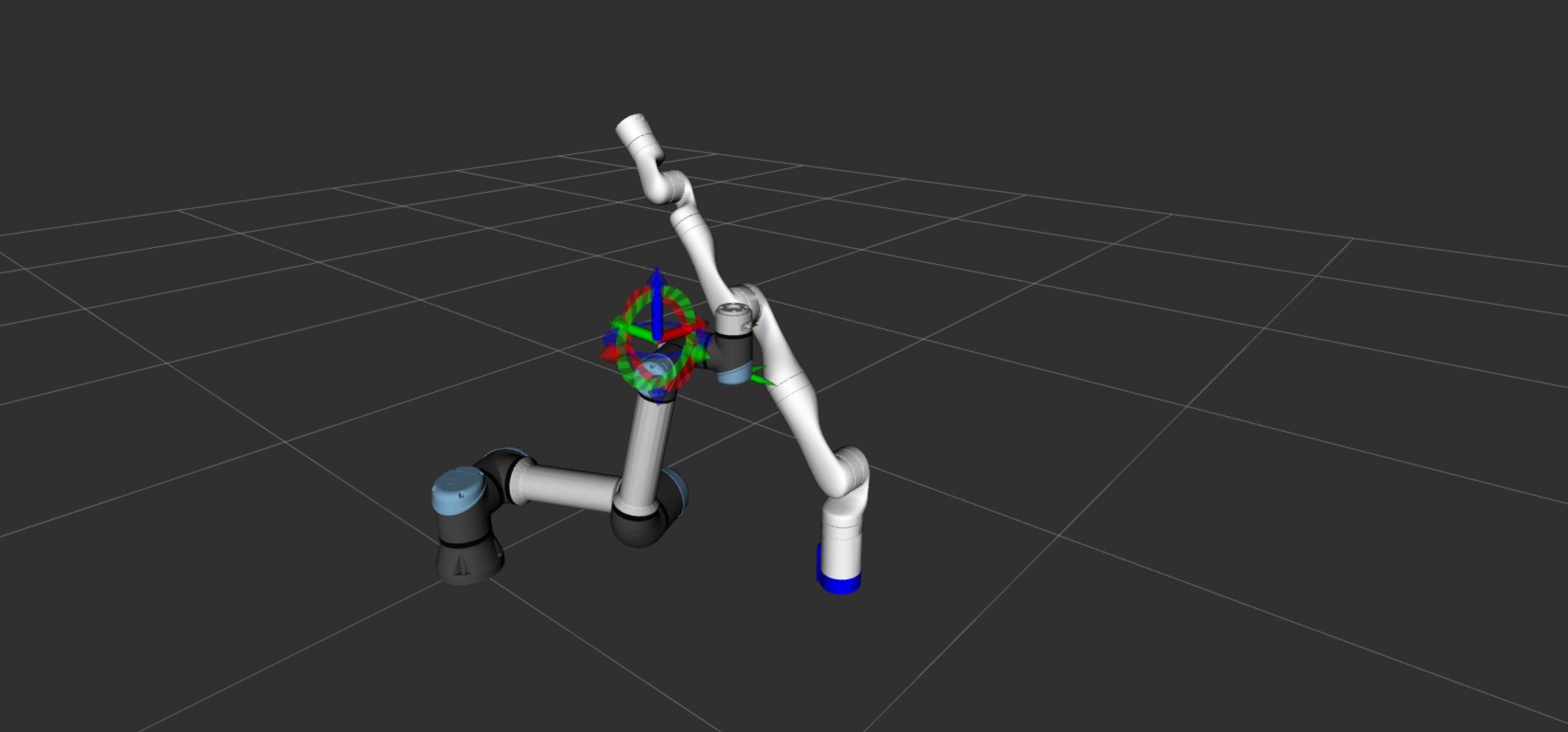
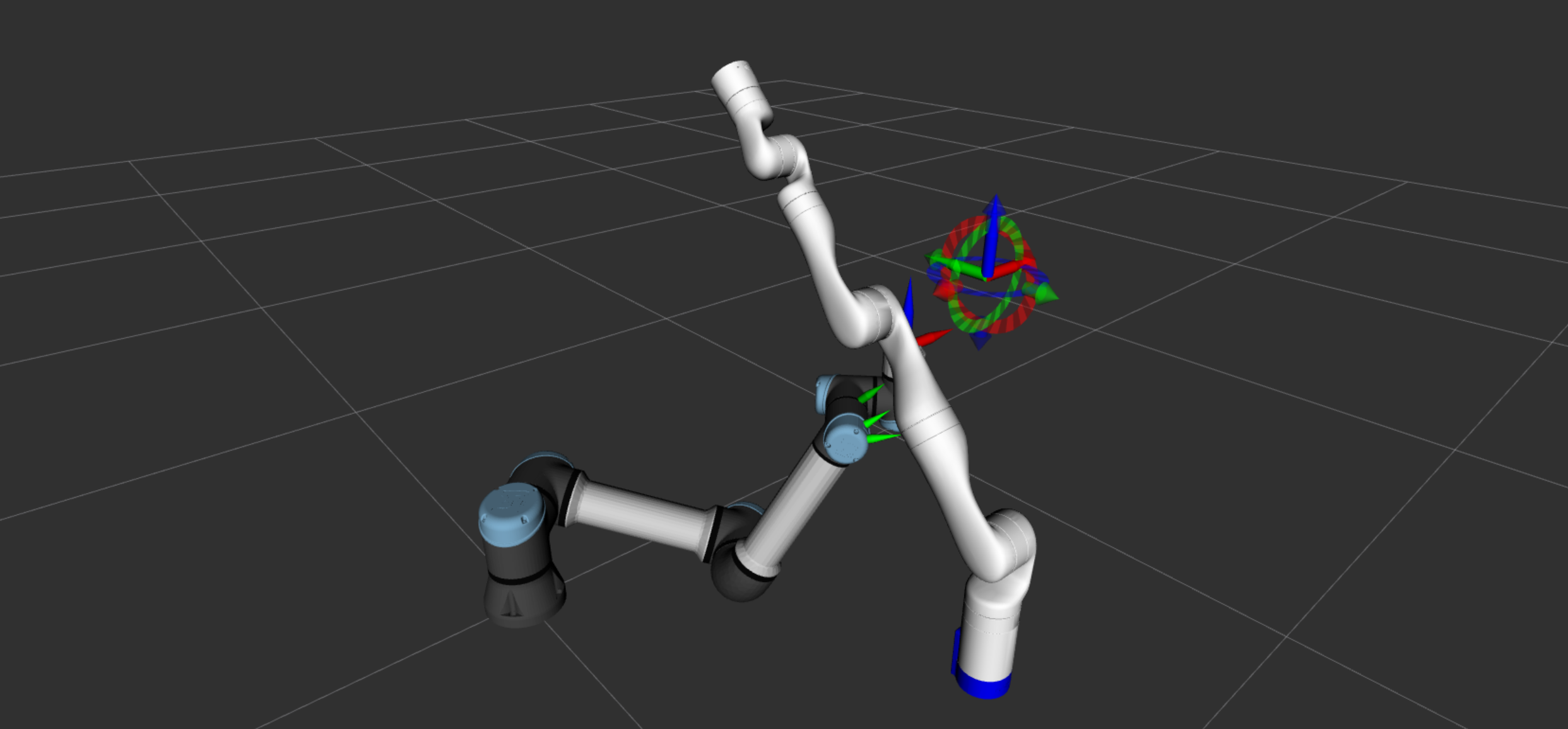
At this point you can play around with this setup of dual arm controller by modifying tasks, constraints and target motion for each arm. You can for example change:
The full sources for this controller are available here. Also, the source code including environment setup can be found in mc_rtc_tutorials repository.